
Role
UX Research
UX Design
Visual design and branding
Summary
In support of earthquake preparedness initiatives from the City of San Francisco, SafeHome makes obscure government earthquake safety data accessible to the general public, in addition to information on geological risks and preparedness resources. As lead Product Designer, I worked with engineering, data science, and product management to develop a web app from original research to MVP.

The problem
San Francisco is at risk for a major earthquake in the coming years, but public data around residential earthquake compliance and safety is currently hard to find and navigate.

Understanding user needs
While the original scope was to make local earthquake safety data easier to access, we wanted to check user needs and to validate the idea. Budget constraints limited our research to surveys, yielding upwards of 50 responses, which both confirmed the original idea and highlighted these additional priorities:
Address lookup with building, liquefaction, and tsunami safety information
General earthquake preparedness resources
Browsable earthquake safety map of San Francisco
Ability to share building safety report
Information on the project and its data sources
Clear, actionable, and reassuring stance around earthquake safety
Competitive analysis revealed some similar tools targeted at more technical users, while also highlighting the need for an accessible option unified with preparedness resources.
Exploring interface formats
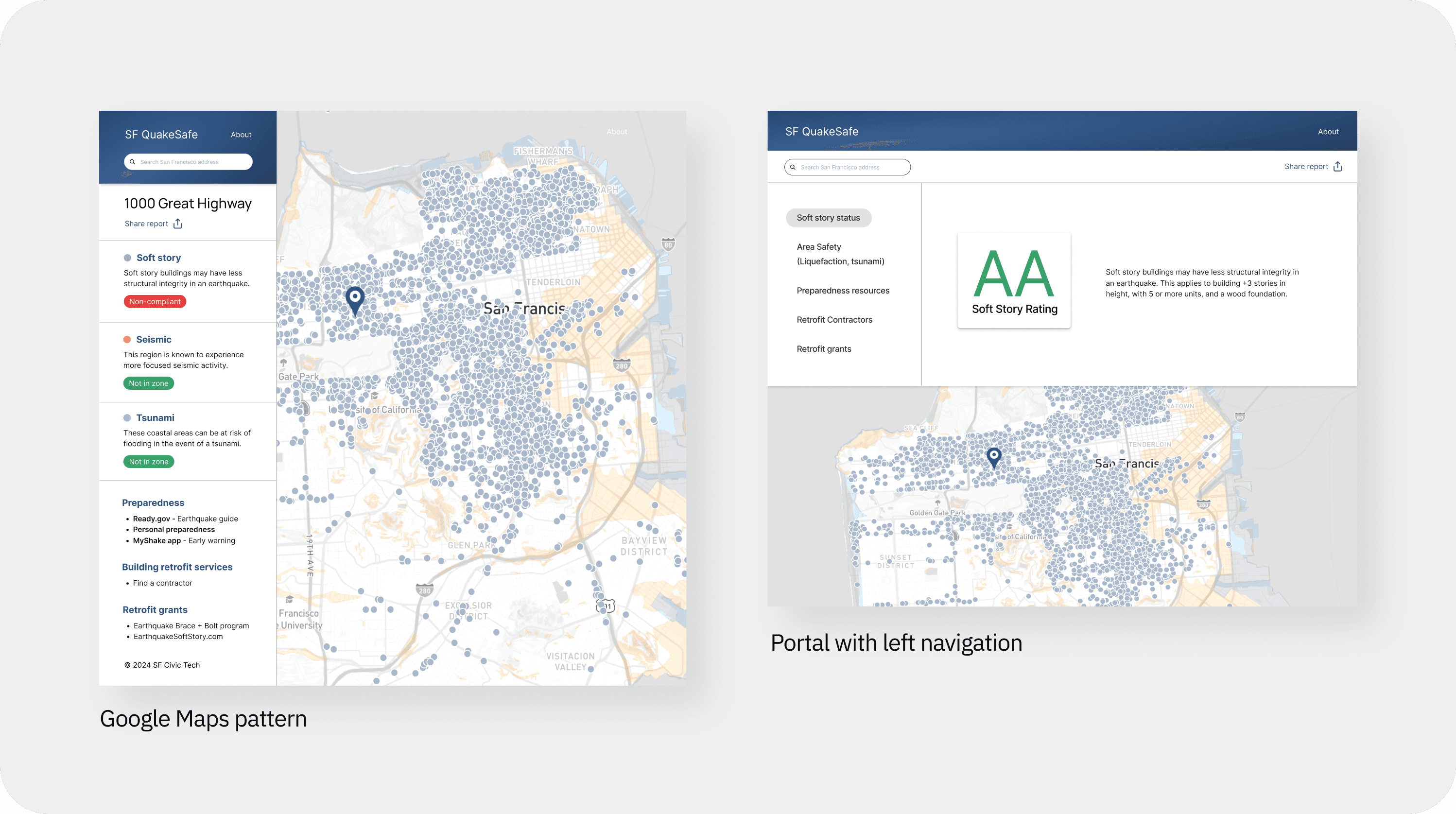
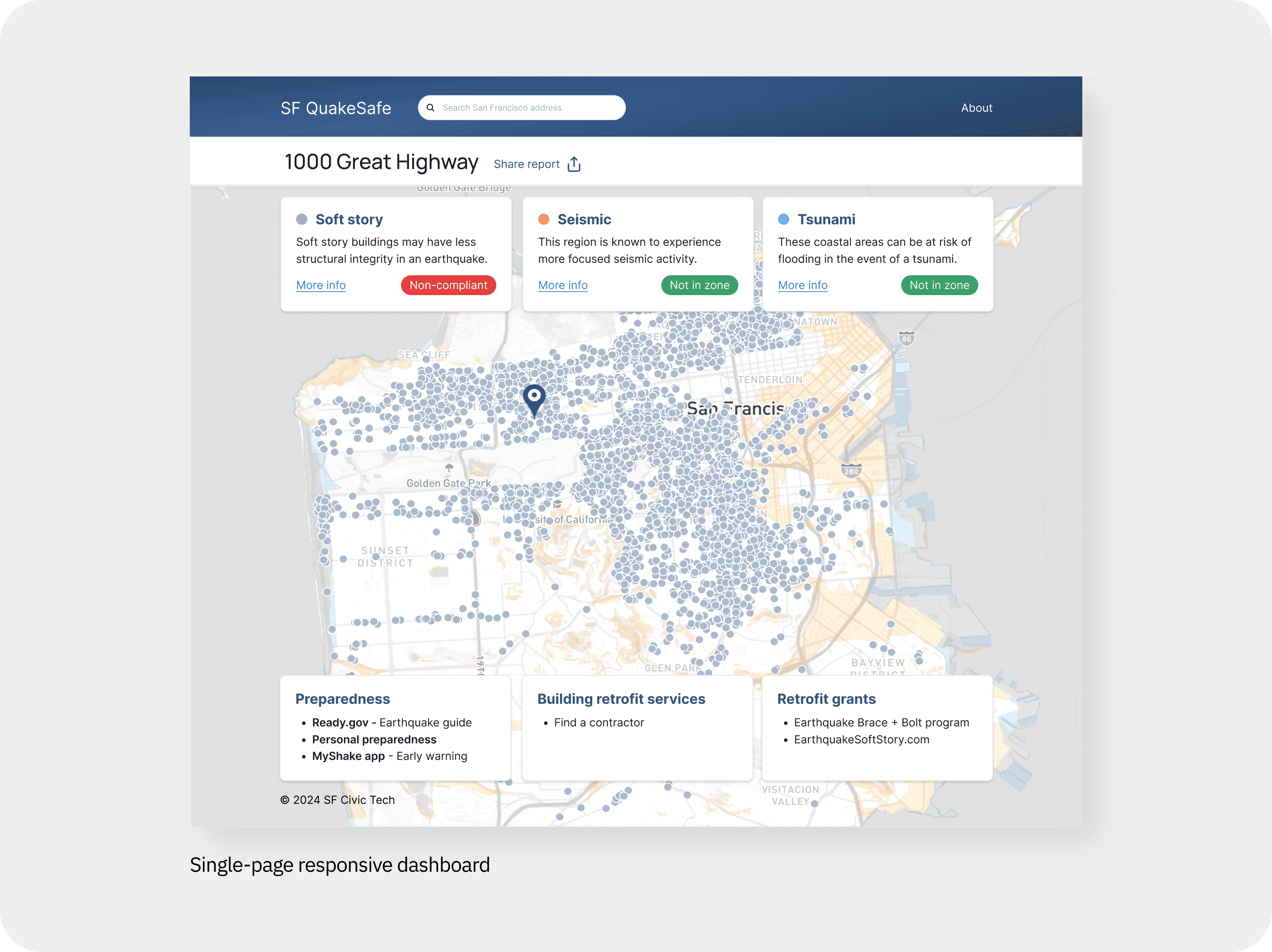
Given the user priorities, I considered several archetypal layouts, built with Chakra UI for speed and per the engineering team. The interface archetypes considered:
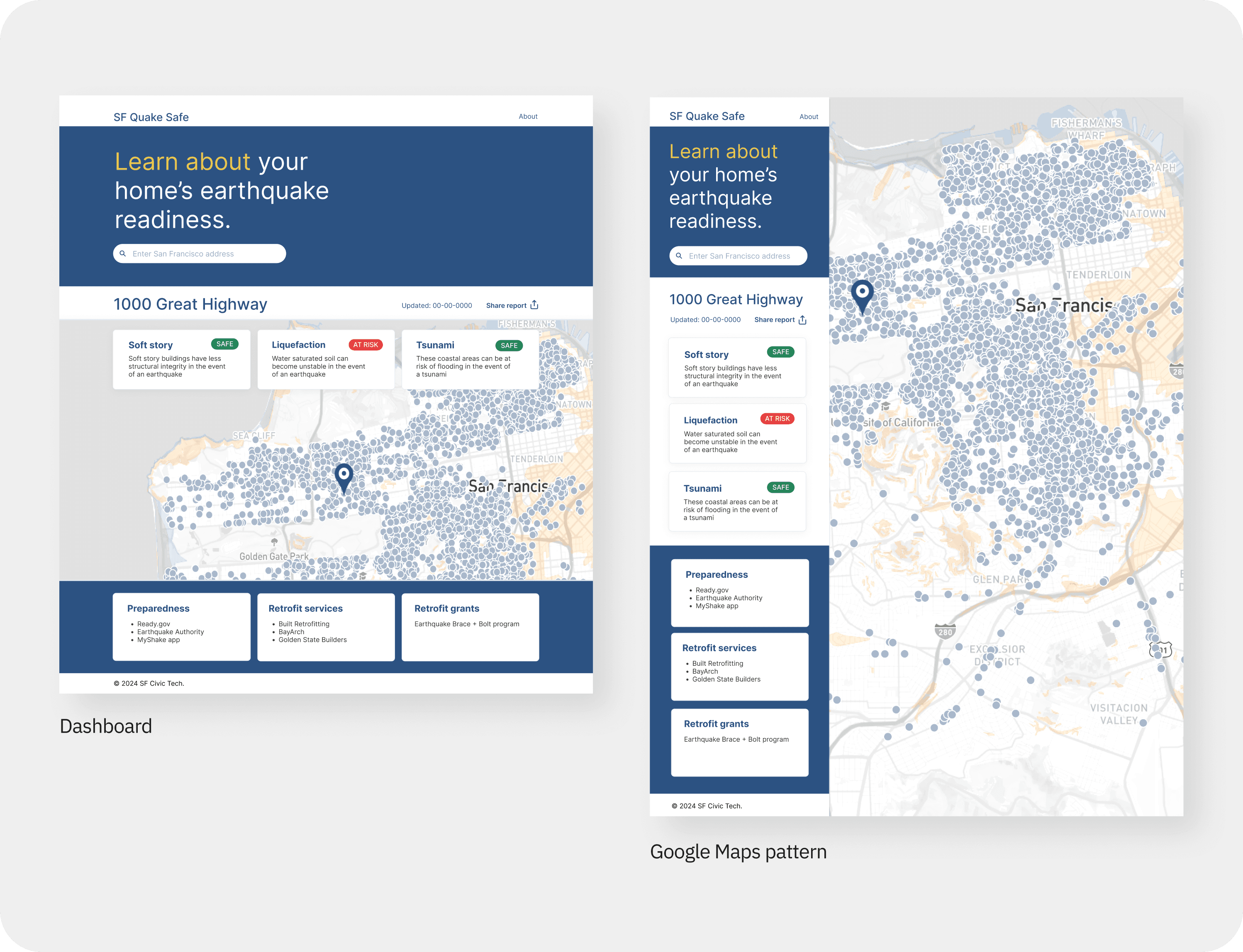
Google Maps pattern: Map-focused, with a scrollable side panel. Although familiar to most users, this ended up putting too much emphasis on the map, when our research revealed that the hazard data was of higher priority to the user.
Portal with left navigation: Allowing for dedicated pages per data type. This was decided against since it would require additional interaction to use, possibly posing difficulty for those with screen readers and the less computer literate.
Single-page responsive dashboard: Prioritizing seismic risks and safety information. This was chosen because it would be easily accessible on all devices and for all user types (including those with screen readers), while also providing an easy, single-glance report after address lookup.
Defining user flows
Once a layout was selected, I mapped easy ways for users to meet their needs.
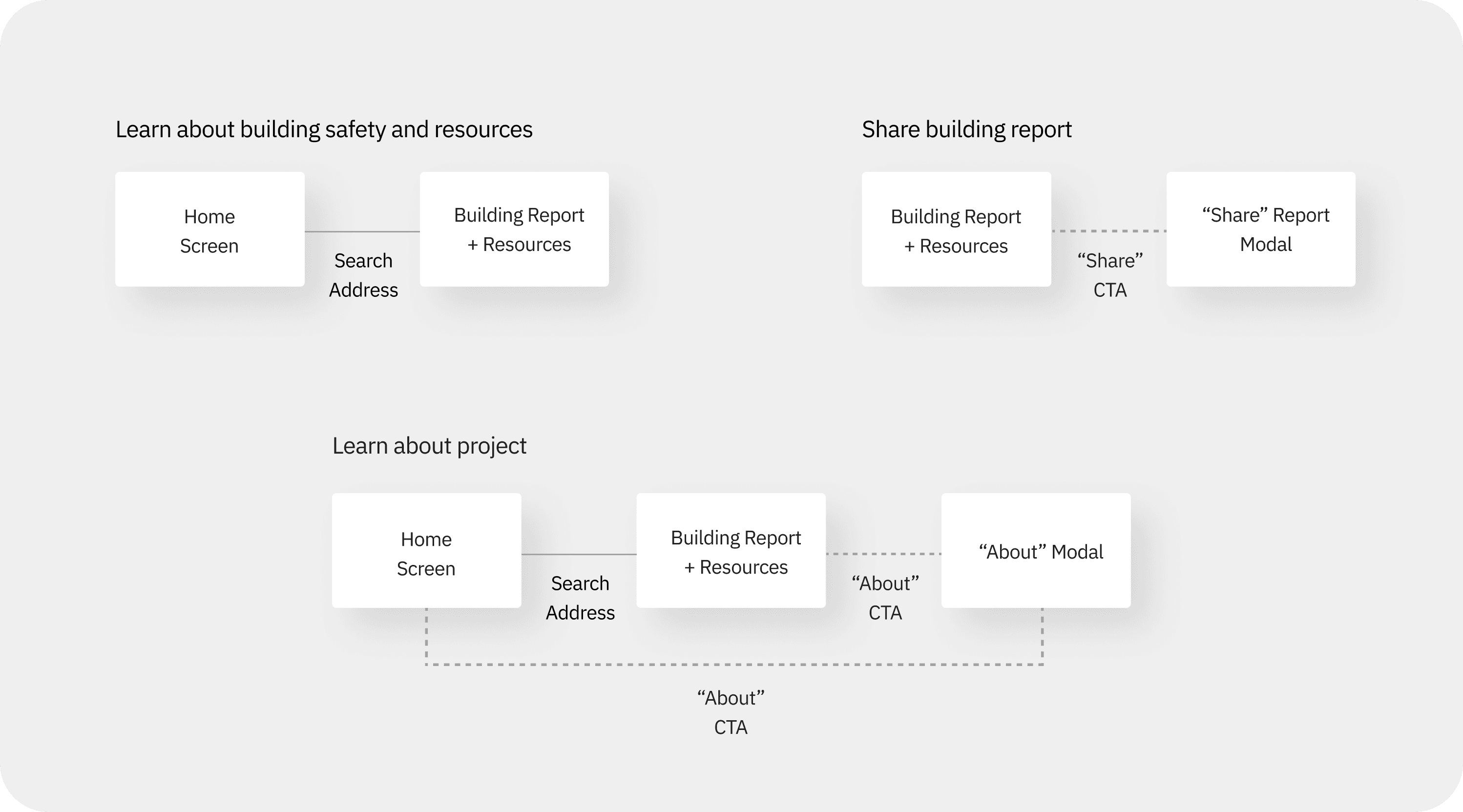
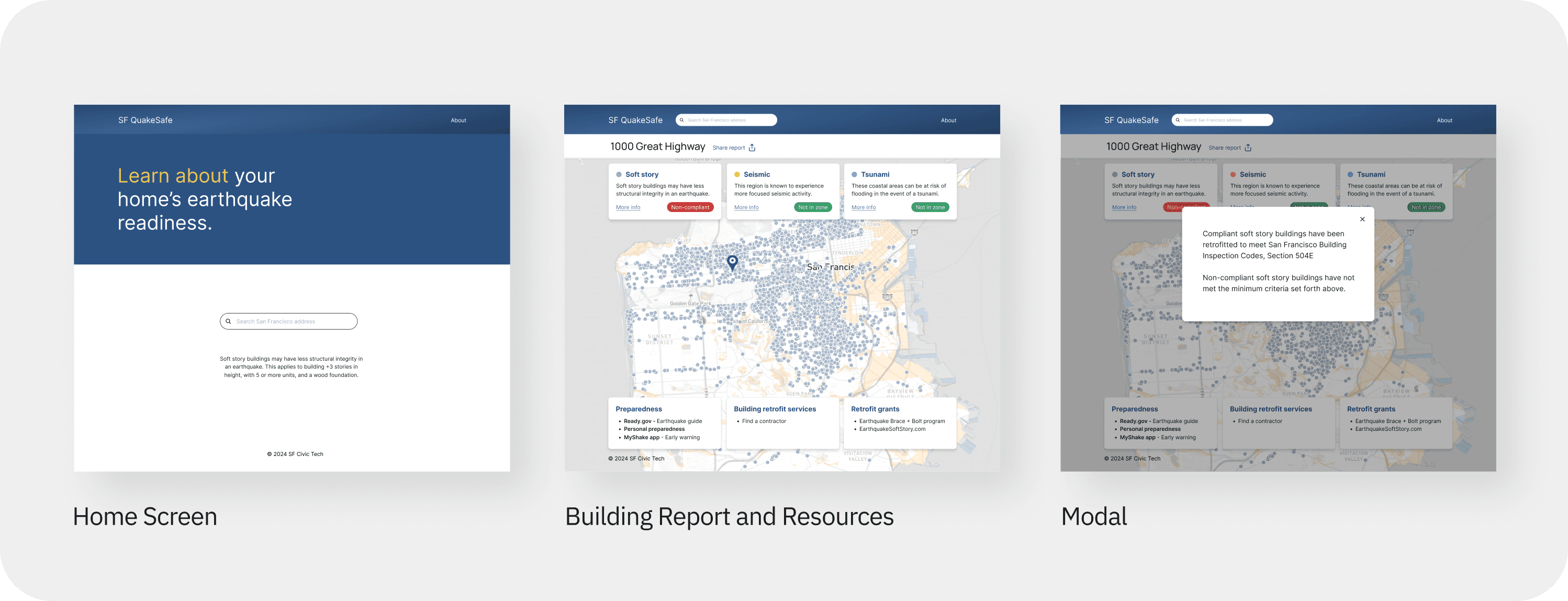
Based on the user flows, three screen modes were identified as necessary:
Home Screen: address lookup and branding
Building Report and Resources (dashboard)
Modals: supporting information
Gathering stakeholder feedback
Throughout the design process, collaboration with the product team led to further refinement and testing. The data science side wanted users to be able to browse the map without entering an address, prompting a redesign to a single page. Interest in the Google Maps pattern also resurfaced from the engineering side, prompting A/B testing, which confirmed the Dashboard as the preferred format.
During early research, we realized liability could be a concern, so I recommended reaching out to the City of San Francisco for guidance on how to approach data transparency. After a meeting with the City, we fine-tuned the language to match the City’s intent and give users a clearer understanding of how safety is being assessed.

Testing usability, visual design, and concept
In collaboration with the team, I designed a script to guide testing for usability, get visual design feedback, and to revalidate the concept in moderated interviews with San Francisco residents over Zoom. Testing combined the help of the product manager and another designer to facilitate the process. A pilot test allowed further refinement of the testing script and materials.

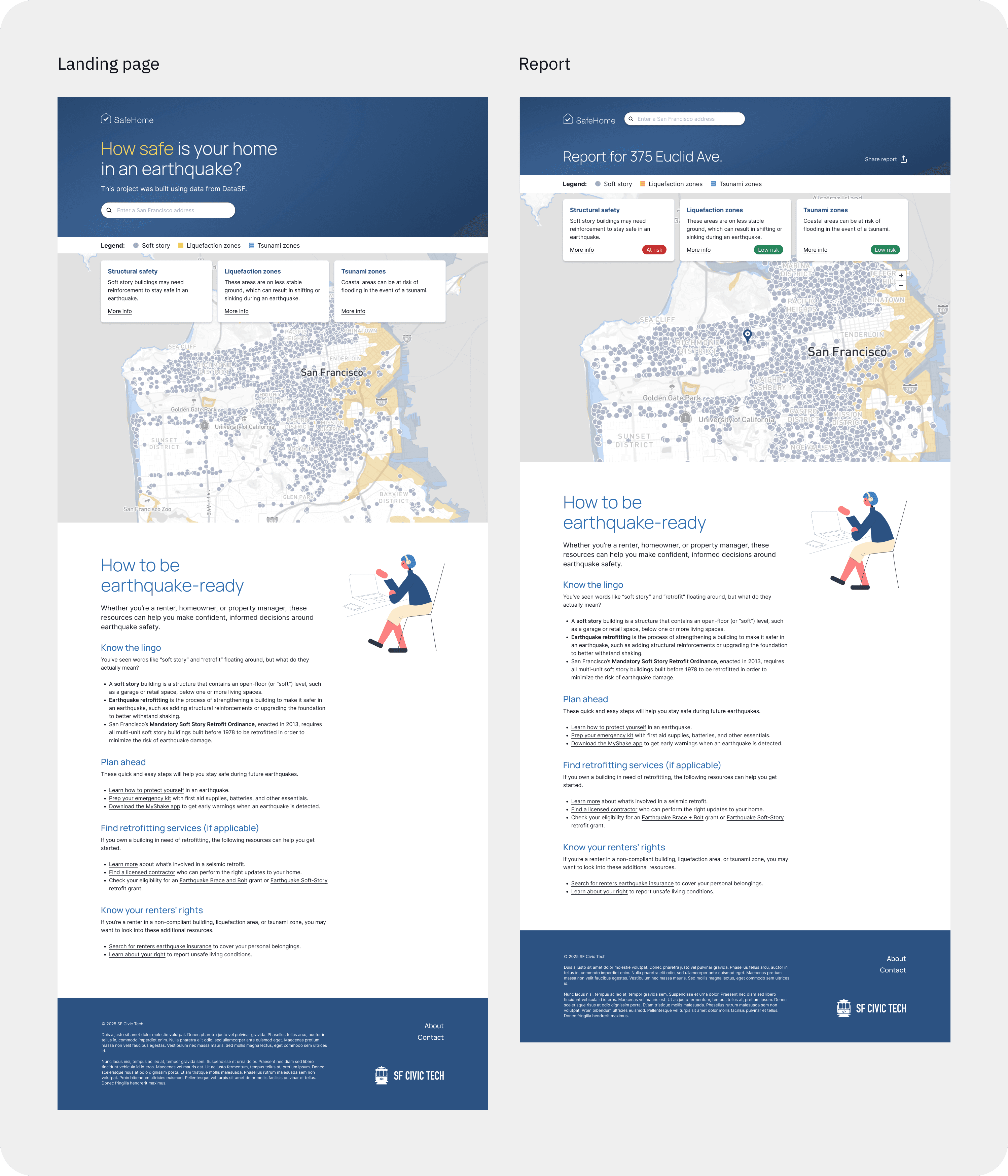
Based on the findings, I worked with the team to evaluate and prioritize several improvements, listed and illustrated below:
Expand bottom three preparedness cards into a more approachable and useful content section
Solve for map confusion with a more visible legend
Add search button for clear call-to-action (not shown)
Reduce jargon and make language more approachable throughout
Introduce a new name (SafeHome) to allow for future expansions beyond earthquake safety
Visually differentiate Report page, while maintaining browsable map on Landing page (with no input required to browse)
Impact and learnings
I led product design through MVP, with testing showing positive user sentiment and alignment with San Francisco government initiatives. As a public goodwill effort, sustained impact depends on factors beyond the design — organizational priorities, funding, and government adoption — and I came to see the absence of a business stakeholder as a meaningful constraint on the project's long-term potential.
Additionally, surfacing this data publicly calls attention to what I estimated to be at least $25MM in repairs on the part of property owners to get their buildings to code. I wondered if the project was ethical as perhaps the City is handling this issue on their own, and publicly surfacing this data could create fear in tenants and possible vacancies in buildings. Also, the local government did not respond to our outreach for endorsement or further involvement with the project.
In retrospect I'd have used a more targeted, compensated research pool to sharpen findings.